
Keep an eye on your car, wherever you are
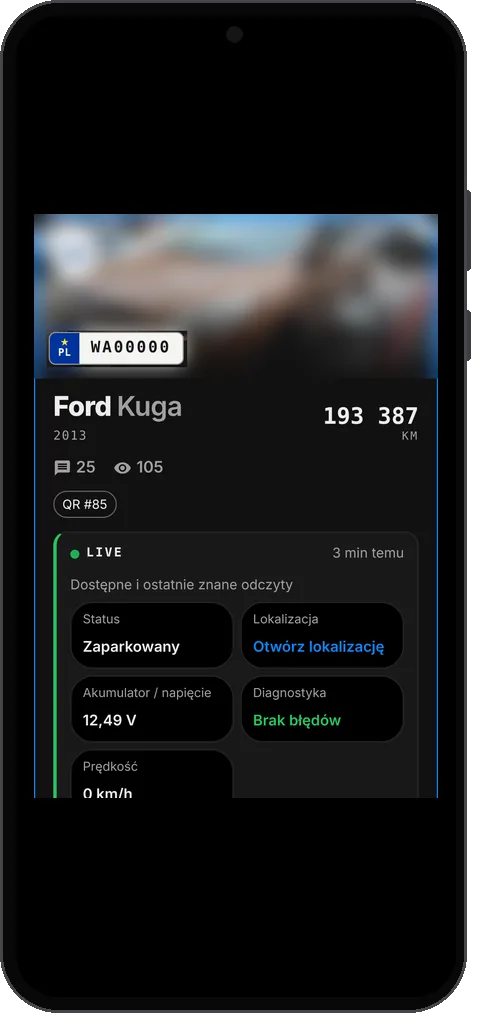
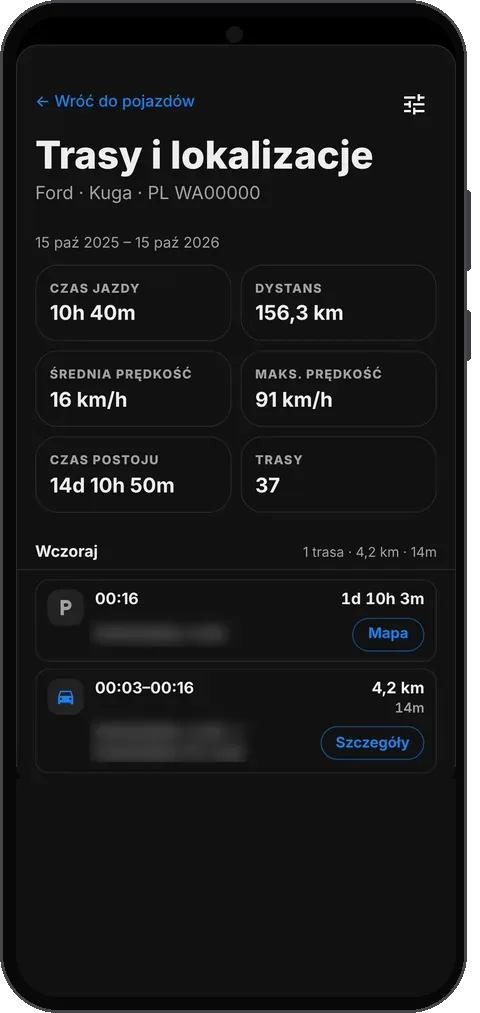
DriverLink Live is a module you plug into your car. The app shows whether it's parked or on the move, where it was last, which trips it has made and any fault codes it reports. When something important happens, you're notified straight away.
DriverLink Live is a Pro feature.
What is DriverLink Live?
It's a small module fitted in your car that links it to your DriverLink account. Once connected, the vehicle card shows live data and the latest readings.
Live works with the vehicle journal: the mileage updates itself, and trips, stops and diagnostics are recorded without manual entry.
How it works
- 1
Add your car and turn on Pro
Create an account, add your vehicle and activate DriverLink Pro.
- 2
Plug in the Live module
The module is assigned to your car and starts sending data straight away.
- 3
Check your car on your phone
Status, location, trips, readings and diagnostics are on the vehicle card – in the app and on driverlink.pl.
- 4
Set up notifications
Choose what you want to be notified about, separately for each car.
What DriverLink Live can do
Which readings you see depends on the car model and the data its computer provides.
Status and last location
Whether the car is moving, has the engine running or is parked – and where it was last seen.
Trips and stops
Drives and stops are recorded automatically, with distance, duration, average and top speed. Replay any trip on the map.
OBD diagnostics
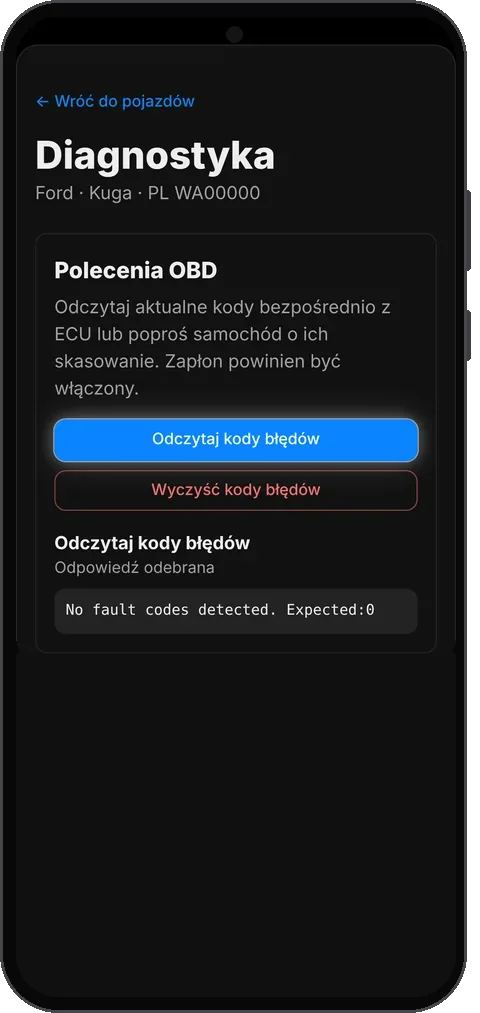
Fault codes (DTC) with their history. Read them straight from the car's computer or have them cleared.
Vehicle readings
For example battery voltage, fuel level, odometer, RPM, coolant temperature, range or oil life – if the car provides them.
Push notifications
Module unplugged, no data for 24 hours, weak battery, charging problems, an overheating engine, the car moving with the ignition off and new fault codes.
Automatic mileage
Live keeps the mileage up to date, so service reminders in the journal count kilometres without your help.
Screenshot coming soon
Screenshot coming soon
Real app screens (Polish UI). Addresses and the car photo are blurred.
When it helps
Your car is parked outside overnight
If someone moves the car with the ignition off or unplugs the module, you're notified straight away.
A frosty morning
Set a battery voltage threshold and find out about a problem before the car won't start.
A warning light comes on
Check the fault code and its history in the app before you go to the mechanic.
Where and how much you drive
Browse trips and stops day by day, with a driving summary.
DriverLink Live with Pro
To use Live you need a DriverLink Live module and an active Pro plan.
Pro with DriverLink Live
- Live data, trips and diagnostics
- DriverLink Live notifications for every car
- Up to 10 vehicles, SMS and contact controls
See the pricing page for the current Pro price. Pricing
Privacy and safety
- Live data, including location and trips, is visible only to you when you're signed in.
- Someone who messages you by plate or QR sticker sees neither your Live data nor your contact details.
- You decide what you're notified about and through which channels.
- Fault codes are never cleared on their own – it always needs your confirmation.
DriverLink Live FAQ
What do I need to use DriverLink Live?
An active Pro plan and a DriverLink Live module assigned to your car. That gives you live data, trips, diagnostics and notifications.
How do I order a DriverLink Live device?
Write to us through the contact form and we will help you order the module and assign it to your car.
What data will Live show for my car?
Always the car's status and last location. Other readings, such as fuel level, temperatures or oil life, depend on what the car's computer provides.
Can I turn off specific notifications?
Yes. In the “DriverLink Live alerts” settings you choose events and notification channels separately for each connected car.
Get your car ready for DriverLink Live
Get the app, add your car and turn on Pro – plug in the DriverLink Live module.
See the vehicle journal